Artwork Guidelines
Prepare your packaging design for printing, one step at a time.
Learn which file to send, how to set up your colours, and where to place your text and images.
Before You Start
Artwork is the design printed on your packaging. It includes your logo, colours, pictures, patterns and text.
Start with the approved template for your box. If any instruction below differs from your order-specific template, follow the template or ask us before making changes.
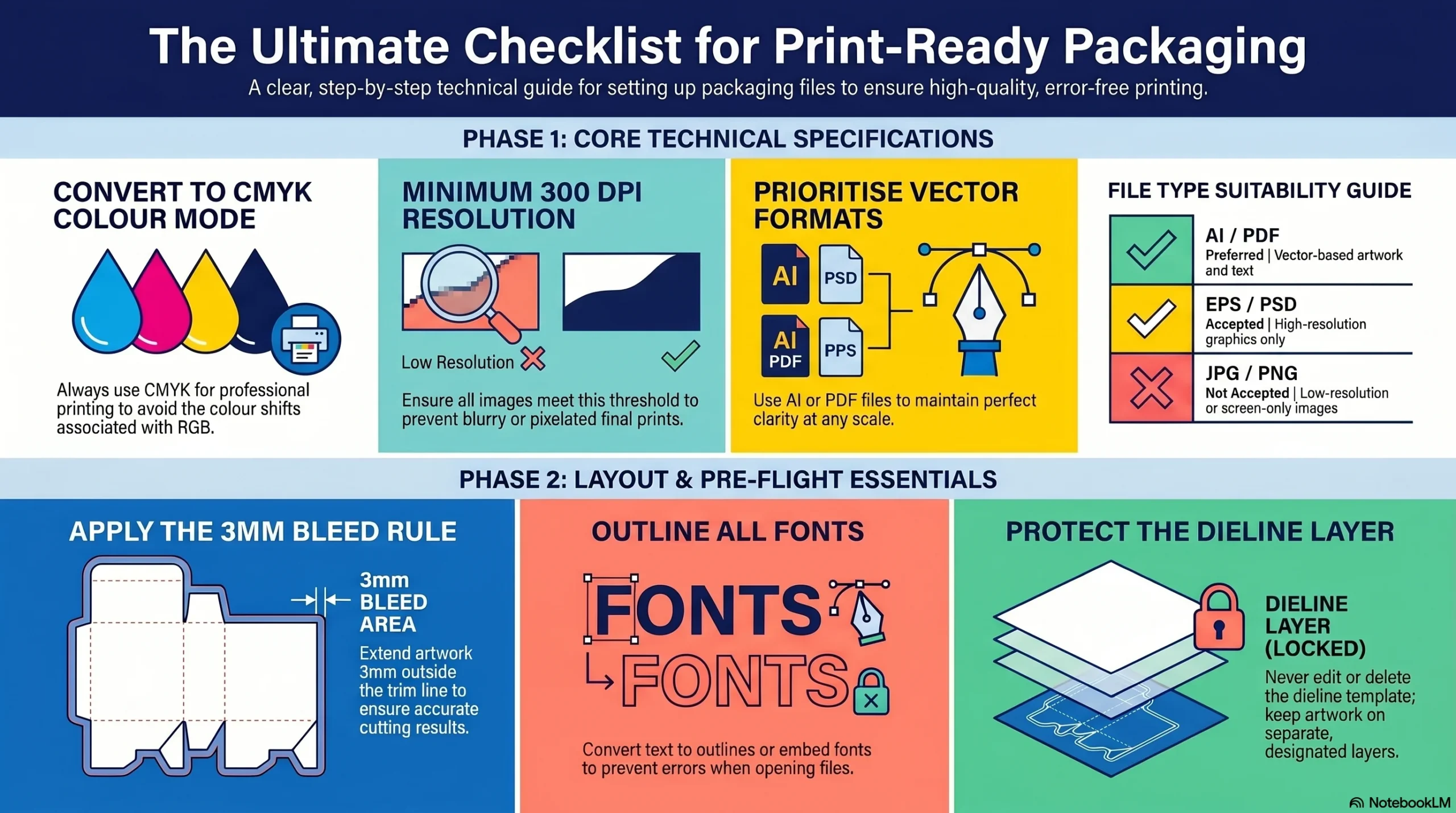
Quick Artwork Checklist
These are the main things to check. Each one is explained below.
Step 1: Get the Correct Box Template
Ask us for the approved template for your box size and style before you start designing.
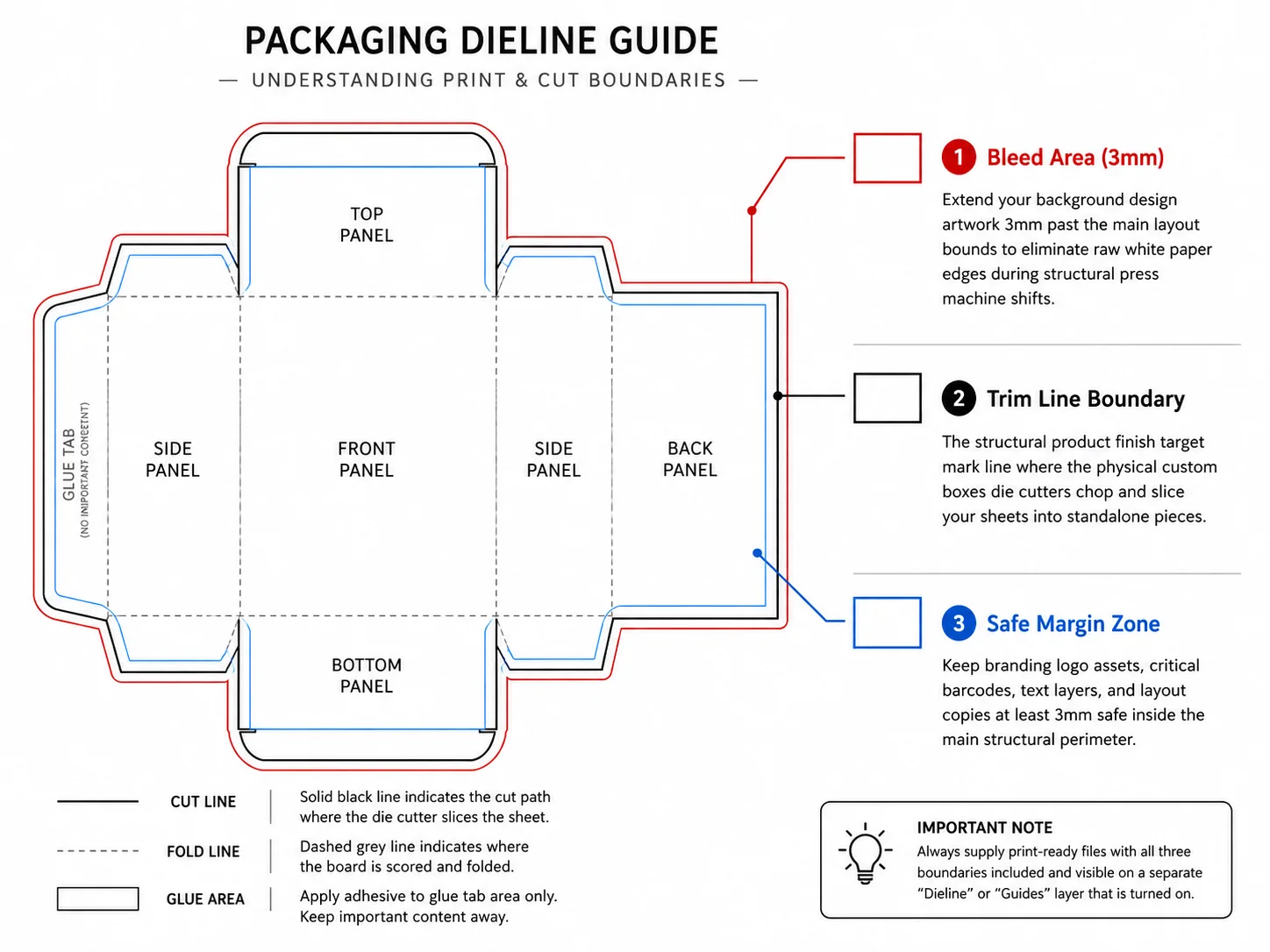
This template is called a dieline. It shows your box laid flat, including the panels, cut lines, fold lines and glue areas.
| Template Part | What It Means |
|---|---|
| Cut line | Where the material will be cut. |
| Fold or crease line | Where the box will fold. |
| Glue area | The part used to join the box together. |
Step 2: Choose the Right File Format
A file format is the type of file you save. The letters at the end of a file name show its format, such as .pdf or .ai.
| Format | What to Send |
|---|---|
| PDF (.pdf) | A print-ready file with the correct box size, bleed, images and fonts. |
| AI (.ai) | An Adobe Illustrator file. Embed pictures or include any linked image files. |
| EPS (.eps) | A graphics file often used for logos and illustrations. Check fonts and included images. |
| PSD (.psd) | An Adobe Photoshop file prepared at the final print size with suitable resolution. Keep useful layers available. |
What Is Vector Artwork?
Vector artwork uses shapes and paths that stay sharp when resized. It is useful for logos and text. AI, EPS and PDF files can contain vector artwork, but the file extension alone does not guarantee it.
Can I Send a JPG, PNG or Screenshot?
A high-quality JPG or PNG may be suitable as a picture within your design. It does not replace a complete print-ready box layout. Avoid screenshots and send original files wherever possible.
Step 3: Set Your Colours to CMYK
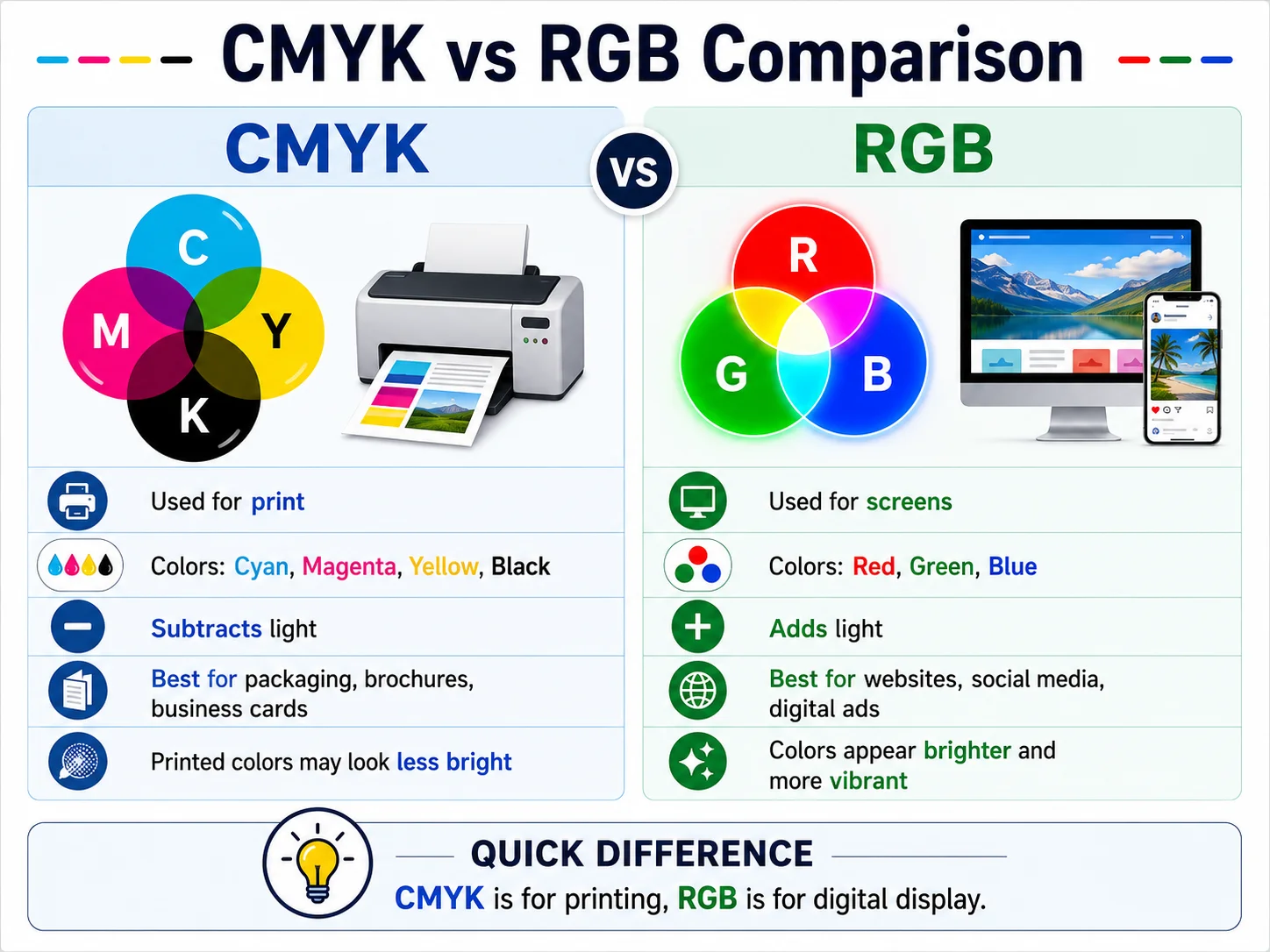
Screens and printing create colours differently. That is why a colour on your phone may look different on a printed box.
| Colour Mode | Simple Explanation |
|---|---|
| RGB | Red, green and blue light. Used by screens, including phones and computers. |
| CMYK | Cyan, magenta, yellow and black ink. Used for standard full-colour printing. |
Prepare standard print artwork in CMYK. If your design is RGB, convert it using your design software and review the colours afterwards.
Some bright screen colours become less vivid after conversion. If a brand colour needs particular attention, provide its colour reference and discuss it with us before submitting.
Step 4: Use Clear, High-Quality Pictures
For photographs and other pixel-based images, aim for 300 ppi at the final printed size. This is often called “300 DPI” in artwork instructions.
In simple terms, your picture needs enough detail for the size at which it will appear on the box.
- Use the original, highest-quality image available.
- Avoid images copied from websites or social media.
- Check the resolution after resizing the picture in your design.
- Use vector files for logos where available.
Example: A picture that looks clear in a small online thumbnail may become blurry when enlarged across a box panel. Changing its resolution setting to 300 does not restore missing detail.
Step 5: Add Bleed and Leave a Safe Area
These three terms explain where your background should extend and where important details should stay.
Bleed: Extra Background
Extend background colours and edge-to-edge pictures 3 mm beyond the cut line, unless your template states otherwise. This helps prevent unwanted white edges after cutting.
Trim: The Cut Line
This is where the material is intended to be cut. Any artwork outside this line is normally removed during cutting.
Safe Area: Important Details
Keep text and logos at least 3 mm inside the cut line, unless your template requires more space. Keep them clear of folds, windows and glue areas too.
Step 6: Check Text, Fonts and Barcodes
A font is the style of your lettering. If a font is missing when your file is opened elsewhere, the text may change or move.
Follow the font requirements confirmed for your file. The usual options are:
- Embed the fonts: Include the font information within the PDF, where the font licence allows it.
- Convert text to outlines: Turn letters into shapes so they no longer depend on the original font.
Select your text and choose Type → Create Outlines. The shortcut is Ctrl + Shift + O on Windows or Cmd + Shift + O on Mac.
Keep a separate editable copy first. Once outlined, the letters cannot be edited like normal text.
Check the Details at Actual Size
Review spelling, product names, phone numbers, email addresses and website links. Make sure small text is readable at its printed size.
Place barcodes and QR codes on a suitable flat panel, clear of folds and cut edges. Leave the required blank space around each code, avoid stretching it and check its final size.
Step 7: Keep Layers Organised
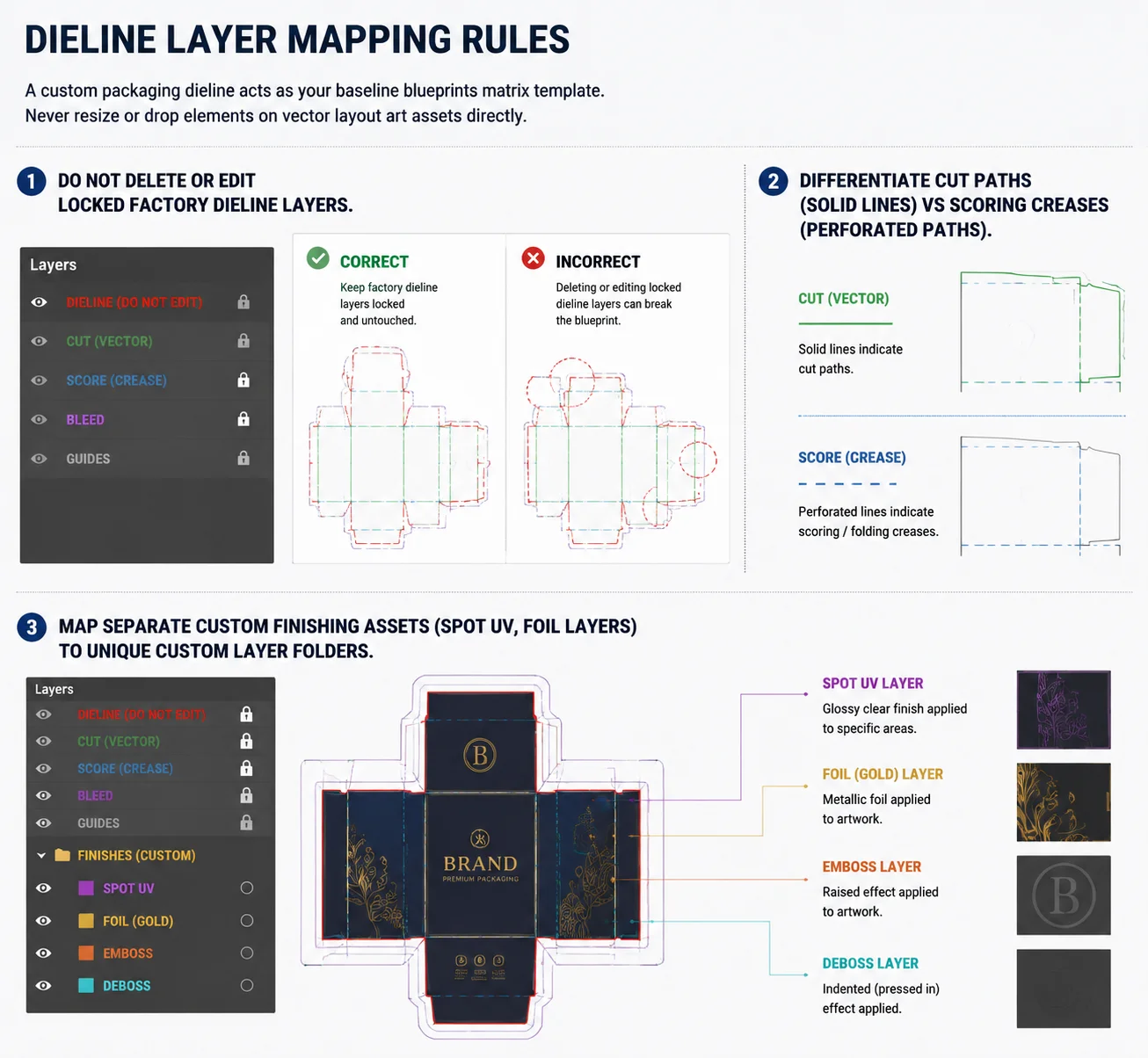
A layer is a separate part of your design file. Layers help keep the printed design, structural template and special finishes apart.
- Dieline layer: Keep the approved cut and fold lines separate. Do not change locked structural layers.
- Artwork layer: Place your printed pictures, text, logo and backgrounds here.
- Finishing layers: Supply foil, spot UV or embossing artwork separately if these are included in your order.
Ask for the setup instructions for each finish, including layer names, spot colours and minimum detail sizes. Follow the submission instructions so the dieline does not accidentally print as part of the design.
Step 8: Export Your Final Print File
Exporting means saving a copy of your design in the format you will send for printing.
- Check the file dimensions against your approved template.
- Include the required bleed.
- Check fonts and image quality.
- Embed images or include linked files when supplying editable artwork.
- Keep required finishing separations.
- Add crop marks only if requested.
PDF/X-1a:2001 and PDF/X-4 are print-production presets. They handle colour and transparency differently. Use the preset confirmed for your order rather than choosing one at random.
Step 9: Give Each File a Clear Name
Use a name that identifies the product, box size and artwork version.
SoapBox_100x60x30mm_V2.pdfIf you have different designs, name each one separately:
SoapBox_Lavender_V2.pdfSoapBox_Lemon_V2.pdfSoapBox_Rose_V2.pdf
Avoid names such as “newfile.pdf” or “final-final2.pdf”. Clearly identify which version should be used for each design.
Step 10: Submit Your Artwork and Check Your Proof
Send your files with:
- Your name and order or enquiry reference.
- Your box style and confirmed measurements.
- The number of different designs.
- Any inside-printing, special colour or finishing requirements.
What Should I Check on the Proof?
A proof is a preview used to review your design before approval. Check the front, back, top, bottom and any inside panels.
Look carefully at spelling, contact details, pictures, text direction, panel placement and the artwork version.
Final Check Before Sending
- The correct template is used without resizing it.
- The file format and colour setup are suitable.
- Pictures are clear at their final printed size.
- Bleed and safe margins follow the approved template.
- Fonts and linked images are included correctly.
- Dieline and finishing layers are kept separate.
- Spelling, contact details and codes have been checked.
- The final version of each design is clearly named.
Frequently Asked Questions
Can I send a design made in Canva?
Your file still needs the correct box template, bleed, image quality and colour setup. Contact us before exporting so we can confirm the settings needed for your order.
Is every PDF ready to print?
No. A PDF can still have the wrong size, blurry pictures, missing bleed or font problems. Check its contents and export settings before sending it.
What if I only have a JPG or PNG logo?
Send the original file at its largest available size for assessment. Its suitability depends on its quality and how large it needs to appear on the box.
Should I delete the dieline before sending?
Keep it separate and follow the submission instructions for your order. Ask us if you are unsure whether to include it in your exported PDF.
Will printed colours match my screen exactly?
Screens use light, while packaging uses ink on a material. The material and finish also affect the result. Discuss colour-sensitive designs and proofing options before approval.
What if I cannot prepare the file myself?
Contact us with your existing files and explain what you need. Confirm the scope of any artwork assistance before proceeding.
Need Help with Your Artwork?
Tell us what you have and which part you need help with. Include your box size, design files and any special requirements with your enquiry.